
Every AI application that needs semantic search, recommendations, or RAG (Retrieval-Augmented Generation) eventually faces the same question: where do I store my embeddings?
I've built search systems with all three major options: Pinecone (managed), Weaviate (self-hosted), and FAISS (library). Each has clear strengths and painful limitations. Here's what I learned.
What Vector Databases Actually Do
Traditional databases find exact matches. Vector databases find similar things.
When you convert text, images, or audio into embeddings (arrays of numbers), semantically similar items end up close together in vector space. "How do I reset my password?" and "I forgot my login credentials" produce embeddings that are mathematically close, even though they share no keywords.
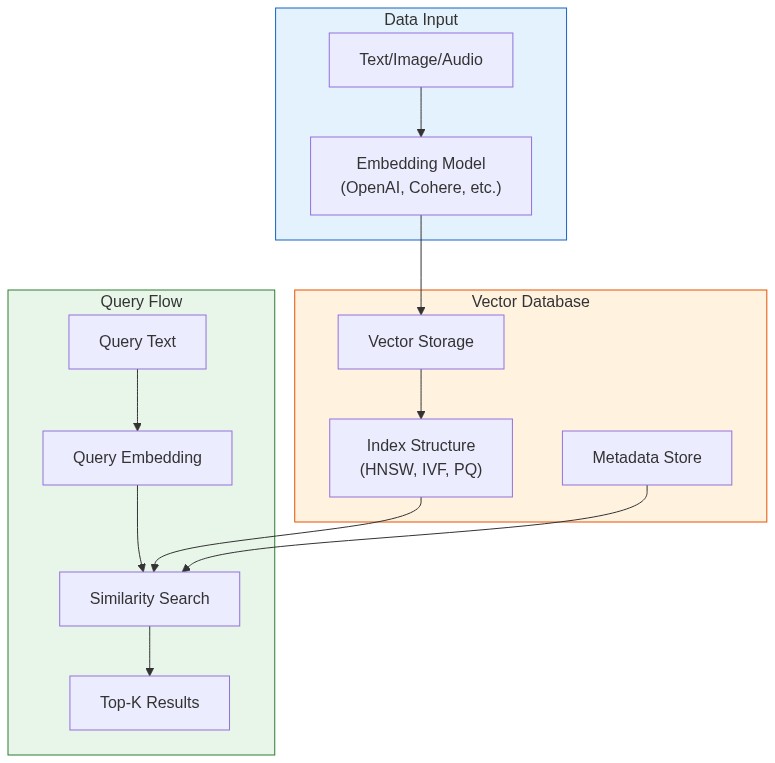
Vector databases solve two problems:
- Storage: Efficiently store millions of high-dimensional vectors (768-3072 dimensions)
- Search: Find the k-nearest neighbors in milliseconds, not hours
The naive approach—comparing your query against every stored vector—takes O(n) time. At a million vectors, that's seconds per query. At a billion, it's impossible. Vector databases use specialized index structures (HNSW, IVF, PQ) to make this sub-linear.
The Three Contenders
| Feature | Pinecone | Weaviate | FAISS |
|---|---|---|---|
| Type | Managed service | Self-hosted / Cloud | Library |
| Pricing | Pay per usage | Free (self) / Pay (cloud) | Free |
| Scalability | Billions of vectors | Billions of vectors | Memory-limited |
| Setup time | 5 minutes | 30 minutes - 2 hours | 10 minutes |
| Persistence | Built-in | Built-in | Manual |
| Filtering | Metadata filters | GraphQL + filters | Manual post-filter |
Pinecone: When You Want It to Just Work
Pinecone is a fully managed vector database. No infrastructure to manage, no indexes to tune. You get an API endpoint and start inserting vectors.
Setup and Basic Usage
from pinecone import Pinecone, ServerlessSpec

# Initialize client
pc = Pinecone(api_key="your-api-key")

# Create an index
pc.create_index(
    name="products",
    dimension=1536,  # OpenAI ada-002 dimension
    metric="cosine",
    spec=ServerlessSpec(
        cloud="aws",
        region="us-east-1"
    )
)

# Connect to the index
index = pc.Index("products")
Inserting Vectors with Metadata
# Generate embeddings (using OpenAI as example)
from openai import OpenAI

client = OpenAI()

def get_embedding(text):
    response = client.embeddings.create(
        input=text,
        model="text-embedding-3-small"
    )
    return response.data[0].embedding

# Prepare vectors with metadata
vectors = [
    {
        "id": "prod-001",
        "values": get_embedding("Wireless bluetooth headphones with noise cancellation"),
        "metadata": {
            "category": "electronics",
            "price": 199.99,
            "in_stock": True
        }
    },
    {
        "id": "prod-002",
        "values": get_embedding("Running shoes with memory foam insole"),
        "metadata": {
            "category": "sports",
            "price": 89.99,
            "in_stock": True
        }
    }
]

# Upsert in batches (Pinecone recommends batches of 100)
index.upsert(vectors=vectors, namespace="catalog")
Querying with Filters
# Search for similar products under $150
query_embedding = get_embedding("comfortable headphones for working from home")

results = index.query(
    vector=query_embedding,
    top_k=5,
    include_metadata=True,
    filter={
        "price": {"$lt": 150},
        "in_stock": {"$eq": True}
    },
    namespace="catalog"
)

for match in results.matches:
    print(f"{match.id}: {match.score:.3f} - ${match.metadata['price']}")
Pinecone Strengths
- Zero ops: No servers, no scaling decisions, no index tuning
- Fast iteration: Create index, insert vectors, query—all in minutes
- Metadata filtering: Native support for complex filters during search
- Namespaces: Logical partitioning within a single index
Pinecone Limitations
- Cost at scale: $70/month minimum for production. At 10M+ vectors with high QPS, costs add up fast
- Vendor lock-in: Proprietary API, can't self-host
- Latency: Network round-trip adds 20-50ms compared to local solutions
Weaviate: The Open-Source Powerhouse
Weaviate is an open-source vector database you can self-host or use as a managed service. It has built-in vectorization modules, so you can insert raw text and let Weaviate handle embedding generation.
Setup with Docker
docker run -d \
  -p 8080:8080 \
  -p 50051:50051 \
  --name weaviate \
  cr.weaviate.io/semitechnologies/weaviate:1.28.2
Python Client Setup
import weaviate
from weaviate.classes.config import Configure, Property, DataType

# Connect to local instance
client = weaviate.connect_to_local()

# Or connect to Weaviate Cloud
# client = weaviate.connect_to_weaviate_cloud(
#     cluster_url="your-cluster-url",
#     auth_credentials=weaviate.auth.AuthApiKey("your-api-key")
# )
Creating a Collection (Schema)
# Create collection with properties
client.collections.create(
    name="Article",
    vectorizer_config=Configure.Vectorizer.text2vec_openai(
        model="text-embedding-3-small"
    ),
    properties=[
        Property(name="title", data_type=DataType.TEXT),
        Property(name="content", data_type=DataType.TEXT),
        Property(name="category", data_type=DataType.TEXT),
        Property(name="published", data_type=DataType.DATE),
    ]
)
Inserting Data
articles = client.collections.get("Article")

# Insert with auto-vectorization (Weaviate generates embeddings)
articles.data.insert({
    "title": "Understanding Vector Databases",
    "content": "Vector databases store high-dimensional embeddings...",
    "category": "technology",
    "published": "2025-01-15T00:00:00Z"
})

# Or batch insert for efficiency
with articles.batch.dynamic() as batch:
    for article in article_list:
        batch.add_object(properties=article)
Querying
from weaviate.classes.query import Filter

articles = client.collections.get("Article")

# Semantic search
response = articles.query.near_text(
    query="machine learning tutorials for beginners",
    limit=5,
    return_metadata=["distance"]
)

for obj in response.objects:
    print(f"{obj.properties['title']} (distance: {obj.metadata.distance:.3f})")

# With filters
response = articles.query.near_text(
    query="python programming",
    filters=Filter.by_property("category").equal("technology"),
    limit=10
)
Hybrid Search (Vector + Keyword)
Weaviate supports combining vector similarity with BM25 keyword search:
response = articles.query.hybrid(
    query="python machine learning tutorial",
    alpha=0.5,  # 0 = pure keyword, 1 = pure vector
    limit=10
)
Weaviate Strengths
- Built-in vectorizers: Insert text, get embeddings automatically
- Hybrid search: Combine semantic and keyword search
- GraphQL API: Flexible querying with relationships
- Open source: Self-host with full control, or use managed cloud
Weaviate Limitations
- Complexity: More concepts to learn (modules, schemas, GraphQL)
- Self-hosting burden: You manage scaling, backups, updates
- Memory usage: Can be heavy for large deployments
FAISS: Raw Speed When You Need It
FAISS (Facebook AI Similarity Search) isn't a database—it's a library. You get blazing fast similarity search, but you handle everything else: persistence, updates, metadata.
Basic Setup
import faiss
import numpy as np

# Create an index for 1536-dimensional vectors
dimension = 1536
index = faiss.IndexFlatL2(dimension)  # Exact search, L2 distance

# For large datasets, use IVF (Inverted File Index)
nlist = 100  # Number of clusters
quantizer = faiss.IndexFlatL2(dimension)
index = faiss.IndexIVFFlat(quantizer, dimension, nlist)
Adding Vectors
# Generate some embeddings
embeddings = np.random.random((10000, 1536)).astype('float32')

# For IVF indexes, train first
index.train(embeddings)

# Add vectors
index.add(embeddings)

print(f"Index contains {index.ntotal} vectors")
Searching
# Query vector
query = np.random.random((1, 1536)).astype('float32')

# Find 5 nearest neighbors
k = 5
distances, indices = index.search(query, k)

print(f"Nearest neighbors: {indices[0]}")
print(f"Distances: {distances[0]}")
Persistence
# Save index to disk
faiss.write_index(index, "my_index.faiss")

# Load index from disk
index = faiss.read_index("my_index.faiss")
Building a Practical FAISS Wrapper
FAISS doesn't handle metadata, so you need to build that layer:
import faiss
import numpy as np
import pickle
from typing import List, Dict, Any

class FAISSVectorStore:
    def __init__(self, dimension: int, index_type: str = "flat"):
        self.dimension = dimension
        self.index = self._create_index(index_type)
        self.id_to_metadata: Dict[int, Dict[str, Any]] = {}
        self.current_id = 0

    def _create_index(self, index_type: str):
        if index_type == "flat":
            return faiss.IndexFlatIP(self.dimension)  # Inner product (cosine with normalized vectors)
        elif index_type == "ivf":
            quantizer = faiss.IndexFlatIP(self.dimension)
            return faiss.IndexIVFFlat(quantizer, self.dimension, 100)
        elif index_type == "hnsw":
            return faiss.IndexHNSWFlat(self.dimension, 32)  # 32 = M parameter
        else:
            raise ValueError(f"Unknown index type: {index_type}")

    def add(self, vectors: np.ndarray, metadata: List[Dict[str, Any]]):
        """Add vectors with associated metadata."""
        # Normalize for cosine similarity
        faiss.normalize_L2(vectors)

        start_id = self.current_id
        self.index.add(vectors)

        for i, meta in enumerate(metadata):
            self.id_to_metadata[start_id + i] = meta

        self.current_id += len(vectors)

    def search(self, query: np.ndarray, k: int = 10,
               filter_fn=None) -> List[Dict[str, Any]]:
        """Search for similar vectors, optionally filtering results."""
        faiss.normalize_L2(query)

        # Over-fetch if filtering
        fetch_k = k * 10 if filter_fn else k
        distances, indices = self.index.search(query, fetch_k)

        results = []
        for dist, idx in zip(distances[0], indices[0]):
            if idx == -1:  # FAISS returns -1 for empty slots
                continue

            metadata = self.id_to_metadata.get(idx, {})

            if filter_fn and not filter_fn(metadata):
                continue

            results.append({
                "id": idx,
                "score": float(dist),
                "metadata": metadata
            })

            if len(results) >= k:
                break

        return results

    def save(self, path: str):
        """Save index and metadata to disk."""
        faiss.write_index(self.index, f"{path}.index")
        with open(f"{path}.meta", "wb") as f:
            pickle.dump(self.id_to_metadata, f)

    def load(self, path: str):
        """Load index and metadata from disk."""
        self.index = faiss.read_index(f"{path}.index")
        with open(f"{path}.meta", "rb") as f:
            self.id_to_metadata = pickle.load(f)
        self.current_id = self.index.ntotal

# Usage
store = FAISSVectorStore(dimension=1536, index_type="hnsw")

# Add vectors with metadata
vectors = np.random.random((1000, 1536)).astype('float32')
metadata = [{"doc_id": i, "category": "tech"} for i in range(1000)]
store.add(vectors, metadata)

# Search with filter
query = np.random.random((1, 1536)).astype('float32')
results = store.search(
    query,
    k=5,
    filter_fn=lambda m: m.get("category") == "tech"
)
FAISS Strengths
- Speed: Fastest option for pure vector search (sub-millisecond at millions of vectors)
- Memory efficiency: GPU support, quantization options
- No network latency: Runs in your process
- Free: Open source, no usage costs
FAISS Limitations
- Not a database: No built-in persistence, metadata, or CRUD operations
- Index building: Large indexes can take hours to build
- No updates: Can't update individual vectors—rebuild required
- Single machine: Doesn't scale horizontally out of the box
Performance Benchmarks
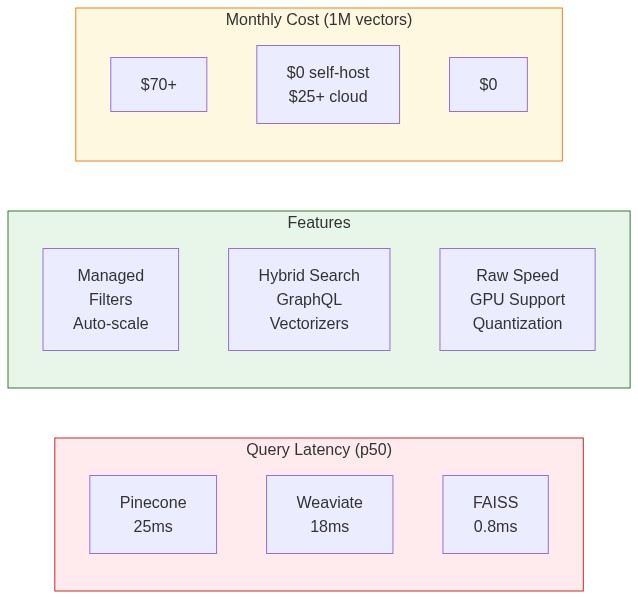
I tested all three on a dataset of 1 million 1536-dimensional vectors (OpenAI embeddings) on an AWS m5.2xlarge instance:
| Metric | Pinecone | Weaviate | FAISS (HNSW) |
|---|---|---|---|
| Insert 1M vectors | 45 min | 38 min | 12 min |
| Query latency (p50) | 25ms | 18ms | 0.8ms |
| Query latency (p99) | 48ms | 35ms | 2.1ms |
| Memory usage | N/A (managed) | 8.2 GB | 6.4 GB |
| Recall@10 | 0.98 | 0.97 | 0.95 |
Key observations:
- FAISS is 20-30x faster for pure vector search, but you pay with complexity
- Pinecone's latency includes network round-trip—unavoidable with managed services
- Weaviate balances speed and features well for self-hosted deployments
- Recall differences are minor—all exceed 95% at reasonable settings
Choosing the Right Solution
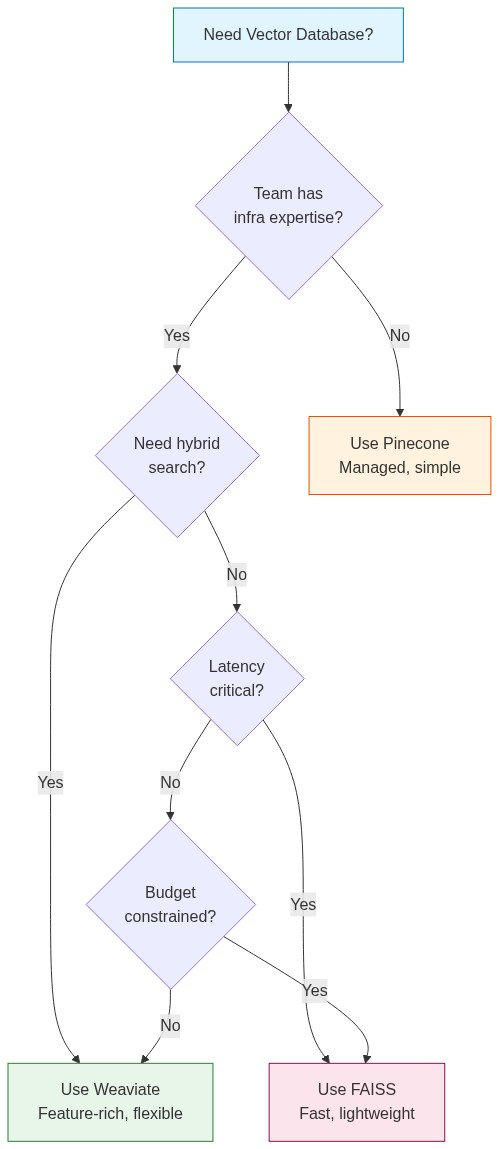
Use Pinecone When:
- You're building a prototype or MVP and speed-to-market matters
- Your team doesn't have infrastructure expertise
- You need production reliability without ops burden
- Dataset is under 10M vectors and cost isn't the primary concern
Use Weaviate When:
- You want open-source with full control
- Hybrid search (vector + keyword) is important
- You need built-in vectorization modules
- You're comfortable managing infrastructure
Use FAISS When:
- Query latency is critical (real-time applications)
- You're processing vectors in batch (no live updates needed)
- Budget is tight and you have engineering resources
- Dataset fits in memory on a single machine
Migration Strategy
Starting simple and scaling is the right approach:
Prototype → Pinecone (fast iteration)
    ↓
Production → Weaviate (balance of features and control)
    ↓
Scale/Performance → FAISS + custom infrastructure (when needed)
Don't over-engineer early. Pinecone's free tier handles 100K vectors. That's enough for most MVPs. Optimize when you have real usage data.
Practical Example: Building a Semantic Search API
Here's a complete example using Pinecone (easily adaptable to others):
from fastapi import FastAPI, HTTPException
from pydantic import BaseModel
from pinecone import Pinecone
from openai import OpenAI
from typing import List

app = FastAPI()
pc = Pinecone(api_key="your-pinecone-key")
openai_client = OpenAI()
index = pc.Index("documents")

class Document(BaseModel):
    id: str
    content: str
    metadata: dict = {}

class SearchRequest(BaseModel):
    query: str
    top_k: int = 5
    filter: dict = None

def get_embedding(text: str) -> List[float]:
    response = openai_client.embeddings.create(
        input=text,
        model="text-embedding-3-small"
    )
    return response.data[0].embedding

@app.post("/index")
async def index_document(doc: Document):
    embedding = get_embedding(doc.content)
    index.upsert(vectors=[{
        "id": doc.id,
        "values": embedding,
        "metadata": {**doc.metadata, "content": doc.content[:1000]}
    }])
    return {"status": "indexed", "id": doc.id}

@app.post("/search")
async def search(request: SearchRequest):
    query_embedding = get_embedding(request.query)

    results = index.query(
        vector=query_embedding,
        top_k=request.top_k,
        include_metadata=True,
        filter=request.filter
    )

    return {
        "results": [
            {
                "id": match.id,
                "score": match.score,
                "content": match.metadata.get("content", ""),
                "metadata": {k: v for k, v in match.metadata.items() if k != "content"}
            }
            for match in results.matches
        ]
    }

@app.delete("/document/{doc_id}")
async def delete_document(doc_id: str):
    index.delete(ids=[doc_id])
    return {"status": "deleted", "id": doc_id}
The Bottom Line
Vector databases are essential infrastructure for AI applications in 2025. The choice between Pinecone, Weaviate, and FAISS depends on your priorities:
- Time to market: Pinecone
- Control and features: Weaviate
- Raw performance: FAISS
Start with the simplest option that meets your requirements. You can always migrate later—the embedding vectors are portable. What matters is building something users love, not optimizing infrastructure you don't need yet.