
You have a Rails app with 500,000 products. Users need to search. The typical advice: "Add Elasticsearch."
But now you have two databases to manage, sync, monitor, and pay for. For most applications under 5 million records, PostgreSQL's built-in full-text search handles the job without the operational overhead.
I've used both extensively. Here's what I learned about when PostgreSQL search is enough—and when it isn't.
The Real Performance Numbers
Let's start with what matters: speed.
I benchmarked PostgreSQL full-text search against Elasticsearch on datasets of varying sizes:
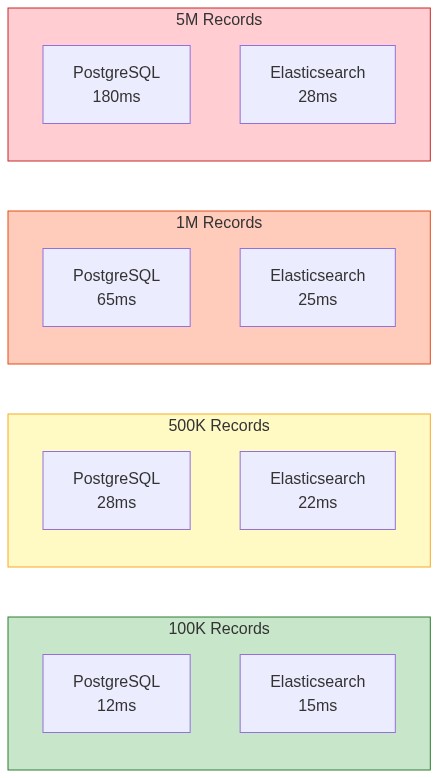
| Dataset Size | PostgreSQL (GIN) | Elasticsearch | Winner |
|---|---|---|---|
| 100K records | 12ms | 15ms | PostgreSQL |
| 500K records | 28ms | 22ms | Elasticsearch |
| 1M records | 65ms | 25ms | Elasticsearch |
| 5M records | 180ms | 28ms | Elasticsearch |
Key insight: PostgreSQL is competitive up to about 500K records. Beyond that, Elasticsearch's inverted index architecture starts to dominate.
But there's a catch. These benchmarks don't account for:
- ETL lag between Postgres and Elasticsearch
- Operational complexity of running two systems
- Consistency issues when data gets out of sync
For many applications, slightly slower search is a worthwhile trade-off for simpler architecture.
PostgreSQL Full-Text Search Fundamentals
PostgreSQL provides two specialized data types for text search:
- tsvector: A sorted list of lexemes (normalized words) with position information
- tsquery: A search query containing lexemes and boolean operators
Basic Example
-- Convert text to tsvector
SELECT to_tsvector('english', 'The quick brown foxes are jumping over the lazy dogs');
-- Result: 'brown':3 'dog':10 'fox':4 'jump':6 'lazi':9 'quick':2

-- Convert search terms to tsquery
SELECT to_tsquery('english', 'quick & foxes');
-- Result: 'quick' & 'fox'

-- Match: does this document contain these terms?
SELECT to_tsvector('english', 'The quick brown foxes')
       @@ to_tsquery('english', 'quick & foxes');
-- Result: true
Notice what happened:
- "foxes" became "fox" (stemming)
- "The" and "are" disappeared (stopwords)
- Word positions are preserved for phrase matching
Building a Searchable Products Table
Let's build a real product search system.
Schema Design
CREATE TABLE products (
    id SERIAL PRIMARY KEY,
    name VARCHAR(255) NOT NULL,
    description TEXT,
    category VARCHAR(100),
    price DECIMAL(10, 2),
    created_at TIMESTAMP DEFAULT CURRENT_TIMESTAMP,

    -- Generated column for full-text search
    search_vector TSVECTOR GENERATED ALWAYS AS (
        setweight(to_tsvector('english', coalesce(name, '')), 'A') ||
        setweight(to_tsvector('english', coalesce(description, '')), 'B') ||
        setweight(to_tsvector('english', coalesce(category, '')), 'C')
    ) STORED
);

-- GIN index for fast full-text search
CREATE INDEX idx_products_search ON products USING GIN(search_vector);

-- B-tree indexes for filtering
CREATE INDEX idx_products_category ON products(category);
CREATE INDEX idx_products_price ON products(price);
The key decisions here:
- Generated column: Automatically updates when source columns change
- Weighted search: Name matches (A) rank higher than description (B)
- GIN index: Optimized for full-text search operations
Inserting Test Data
INSERT INTO products (name, description, category, price) VALUES
('Wireless Bluetooth Headphones', 'Premium noise-cancelling headphones with 30-hour battery life. Perfect for work and travel.', 'Electronics', 199.99),
('Running Shoes Pro', 'Lightweight running shoes with memory foam insole and breathable mesh upper.', 'Sports', 129.99),
('Organic Green Tea', 'Premium loose leaf green tea from Japanese highlands. Antioxidant rich.', 'Food', 24.99),
('Mechanical Keyboard', 'RGB backlit mechanical keyboard with Cherry MX switches. Great for gaming and typing.', 'Electronics', 149.99),
('Yoga Mat Premium', 'Extra thick yoga mat with non-slip surface. Perfect for home workouts.', 'Sports', 49.99);
Querying with Full-Text Search
Basic Search
SELECT name, description, price,
       ts_rank(search_vector, query) AS rank
FROM products,
     to_tsquery('english', 'headphones') AS query
WHERE search_vector @@ query
ORDER BY rank DESC;
Multi-Word Search
-- All words must match (AND)
SELECT name, price
FROM products
WHERE search_vector @@ to_tsquery('english', 'wireless & headphones');

-- Any word matches (OR)
SELECT name, price
FROM products
WHERE search_vector @@ to_tsquery('english', 'wireless | keyboard');

-- Phrase search (words in order)
SELECT name, price
FROM products
WHERE search_vector @@ phraseto_tsquery('english', 'green tea');
Prefix Matching
-- Matches "running", "runner", "runs", etc.
SELECT name, price
FROM products
WHERE search_vector @@ to_tsquery('english', 'run:*');
websearch_to_tsquery: User-Friendly Queries
The websearch_to_tsquery function handles natural user input:
-- Users type: yoga mat -foam
-- Meaning: "yoga" AND "mat" but NOT "foam"
SELECT name, price
FROM products
WHERE search_vector @@ websearch_to_tsquery('english', 'yoga mat -foam');

-- Users type: "green tea" organic
-- Meaning: exact phrase "green tea" AND "organic"
SELECT name, price
FROM products
WHERE search_vector @@ websearch_to_tsquery('english', '"green tea" organic');
This is the best choice for user-facing search boxes—it handles quotes, minus signs, and implicit AND like users expect.
Ranking and Relevance
ts_rank: Basic Relevance Scoring
SELECT
    name,
    ts_rank(search_vector, query) AS rank,
    ts_rank_cd(search_vector, query) AS rank_cd  -- Considers term density
FROM products,
     to_tsquery('english', 'bluetooth | wireless') AS query
WHERE search_vector @@ query
ORDER BY rank DESC
LIMIT 10;
The ranking considers:
- Term frequency in the document
- Weight of the matching field (A > B > C > D)
- Document length normalization
Boosting with Weights
Remember our schema used setweight()? Here's how it affects ranking:
-- Name matches (weight A) score higher than description (weight B)
SELECT name,
       ts_rank(search_vector, to_tsquery('english', 'headphones')) AS rank
FROM products
WHERE search_vector @@ to_tsquery('english', 'headphones')
ORDER BY rank DESC;
You can customize weights:
-- Default weights: D=0.1, C=0.2, B=0.4, A=1.0
-- Custom weights: {D, C, B, A}
SELECT ts_rank('{0.1, 0.2, 0.8, 1.0}', search_vector, query) AS rank
FROM products, to_tsquery('english', 'keyboard') AS query
WHERE search_vector @@ query;
Highlighting Search Results
Show users why a result matched:
SELECT
    name,
    ts_headline('english', description,
        to_tsquery('english', 'headphones'),
        'StartSel=<mark>, StopSel=</mark>, MaxFragments=2, MaxWords=30'
    ) AS highlighted_description
FROM products
WHERE search_vector @@ to_tsquery('english', 'headphones');
Result:
name: Wireless Bluetooth Headphones
highlighted_description: Premium noise-cancelling <mark>headphones</mark> with 30-hour battery life...
Combining Search with Filters
Real search usually includes filters. PostgreSQL handles this efficiently:
SELECT name, price, category,
       ts_rank(search_vector, query) AS rank
FROM products,
     websearch_to_tsquery('english', 'wireless') AS query
WHERE search_vector @@ query
  AND category = 'Electronics'
  AND price < 200
ORDER BY rank DESC
LIMIT 10;
The query planner combines the GIN index (for text search) with B-tree indexes (for filters) efficiently.
Python Integration
With psycopg2
import psycopg2
from psycopg2.extras import RealDictCursor

def search_products(conn, query: str, category: str = None,
                    max_price: float = None, limit: int = 10):
    """Search products with optional filters."""

    sql = """
        SELECT id, name, description, category, price,
               ts_rank(search_vector, websearch_to_tsquery('english', %s)) AS rank,
               ts_headline('english', description,
                   websearch_to_tsquery('english', %s),
                   'MaxFragments=2, MaxWords=20'
               ) AS snippet
        FROM products
        WHERE search_vector @@ websearch_to_tsquery('english', %s)
    """
    params = [query, query, query]

    if category:
        sql += " AND category = %s"
        params.append(category)

    if max_price:
        sql += " AND price <= %s"
        params.append(max_price)

    sql += " ORDER BY rank DESC LIMIT %s"
    params.append(limit)

    with conn.cursor(cursor_factory=RealDictCursor) as cur:
        cur.execute(sql, params)
        return cur.fetchall()

# Usage
conn = psycopg2.connect("dbname=myapp user=postgres")
results = search_products(conn, "wireless headphones", category="Electronics", max_price=200)

for r in results:
    print(f"{r['name']} - ${r['price']} (rank: {r['rank']:.3f})")
    print(f"  {r['snippet']}")
With SQLAlchemy
from sqlalchemy import create_engine, Column, Integer, String, Numeric, func
from sqlalchemy.dialects.postgresql import TSVECTOR
from sqlalchemy.orm import declarative_base, Session

Base = declarative_base()

class Product(Base):
    __tablename__ = 'products'

    id = Column(Integer, primary_key=True)
    name = Column(String(255), nullable=False)
    description = Column(String)
    category = Column(String(100))
    price = Column(Numeric(10, 2))
    search_vector = Column(TSVECTOR)

def search_products(session: Session, query: str, limit: int = 10):
    """Full-text search with SQLAlchemy."""
    search_query = func.websearch_to_tsquery('english', query)

    results = session.query(
        Product,
        func.ts_rank(Product.search_vector, search_query).label('rank')
    ).filter(
        Product.search_vector.op('@@')(search_query)
    ).order_by(
        func.ts_rank(Product.search_vector, search_query).desc()
    ).limit(limit).all()

    return [(product, rank) for product, rank in results]

# Usage
engine = create_engine('postgresql://postgres@localhost/myapp')
with Session(engine) as session:
    for product, rank in search_products(session, "wireless headphones"):
        print(f"{product.name}: {rank:.3f}")
Performance Optimization
Check Your Query Plan
EXPLAIN ANALYZE
SELECT name, ts_rank(search_vector, query) AS rank
FROM products, to_tsquery('english', 'headphones') AS query
WHERE search_vector @@ query
ORDER BY rank DESC
LIMIT 10;
Look for:
Bitmap Index Scan on idx_products_search(good - using GIN index)Seq Scanon large tables (bad - missing index)
Partial Indexes
If most searches filter by category:
CREATE INDEX idx_products_search_electronics
ON products USING GIN(search_vector)
WHERE category = 'Electronics';
Text Search Configuration
For domain-specific vocabulary, create a custom text search configuration:
-- Create custom config based on english
CREATE TEXT SEARCH CONFIGURATION product_search (COPY = english);

-- Add synonyms
CREATE TEXT SEARCH DICTIONARY product_synonyms (
    TEMPLATE = synonym,
    SYNONYMS = product_synonyms  -- file at $SHAREDIR/tsearch_data/
);

ALTER TEXT SEARCH CONFIGURATION product_search
    ALTER MAPPING FOR asciiword WITH product_synonyms, english_stem;
When PostgreSQL Search Isn't Enough
Signs You Need Elasticsearch:
- Dataset over 5M records: PostgreSQL FTS slows down significantly
- Complex relevance tuning: Elasticsearch's BM25 is more configurable
- Faceted search: Elasticsearch aggregations are purpose-built for this
- Near real-time indexing: Elasticsearch handles high-write workloads better
- Distributed search: Elasticsearch scales horizontally
The Hybrid Approach
You can use PostgreSQL as primary database and Elasticsearch for search only:
# Write to PostgreSQL (source of truth)
def create_product(conn, product_data):
    # Insert into PostgreSQL
    product_id = insert_product(conn, product_data)

    # Async: index in Elasticsearch
    index_product_async(product_id, product_data)

    return product_id

# Read from Elasticsearch for search
def search_products_hybrid(es_client, query):
    # Search Elasticsearch for IDs and ranking
    es_results = es_client.search(query)

    # Fetch full data from PostgreSQL
    product_ids = [hit['_id'] for hit in es_results['hits']['hits']]
    return fetch_products_by_ids(conn, product_ids)
pg_search: The Best of Both Worlds
ParadeDB's pg_search extension brings Elasticsearch-level capabilities to PostgreSQL:
-- Install pg_search extension
CREATE EXTENSION pg_search;

-- Create BM25 index (like Elasticsearch)
CREATE INDEX idx_products_bm25 ON products
USING bm25 (name, description, category);

-- Search with BM25 ranking
SELECT name, price, paradedb.score(id) AS score
FROM products
WHERE name @@@ 'wireless headphones'
ORDER BY score DESC
LIMIT 10;
In benchmarks, pg_search matches Elasticsearch performance while keeping everything in PostgreSQL. Worth evaluating if you're hitting PostgreSQL FTS limits.
Decision Framework
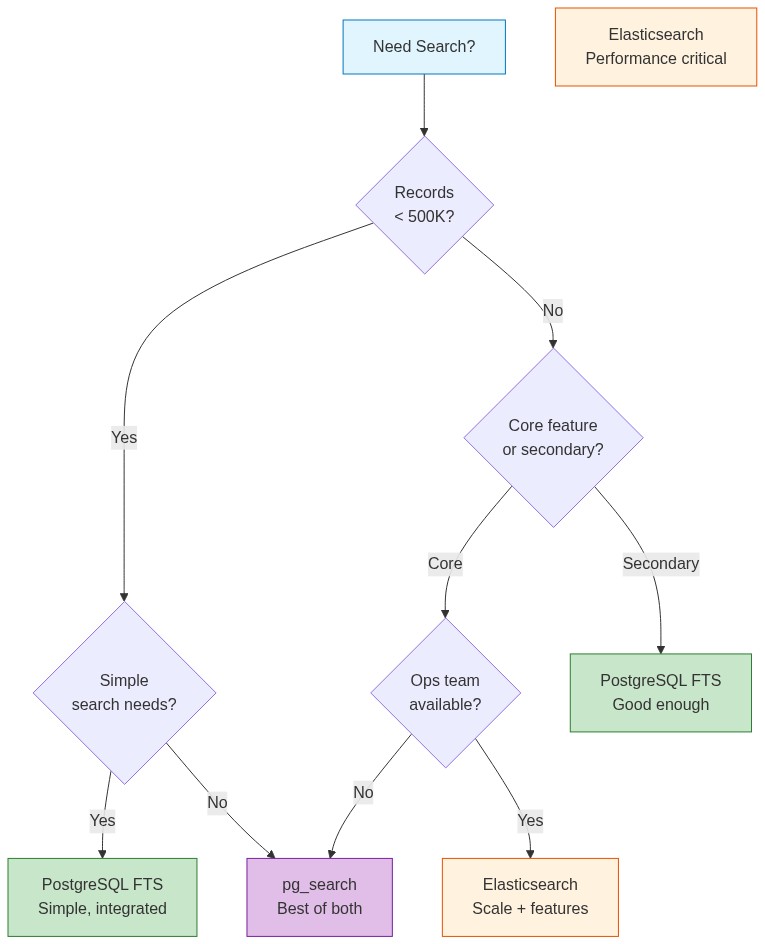
| Scenario | Recommendation |
|---|---|
| < 500K records, simple search | PostgreSQL FTS |
| < 5M records, need operational simplicity | PostgreSQL FTS |
| > 5M records, search is core feature | Elasticsearch |
| Need faceted search / aggregations | Elasticsearch |
| Already using Elasticsearch for logs | Add search there |
| Want PostgreSQL benefits + ES performance | pg_search |
The Bottom Line
PostgreSQL full-text search is production-ready and often overlooked. For applications under a few million records, it provides:
- No sync issues: Search queries the same data as your app
- ACID compliance: Search results are always consistent
- Lower ops burden: One database, not two
- Cost savings: No Elasticsearch cluster to run
The tsvector/tsquery system is powerful. Weighted fields, stemming, phrase search, prefix matching—it's all there.
Start with PostgreSQL. Measure actual performance with your data. Add Elasticsearch when you have evidence you need it, not before.