
Fine-tuning a 7 billion parameter model used to require expensive cloud instances with 80GB+ of VRAM. Not anymore.
QLoRA (Quantized Low-Rank Adaptation) changed the game. I fine-tuned Mistral-7B on a single RTX 4090 using just 8GB of VRAM. The model performs within 1% of full fine-tuning quality. Here's exactly how to do it.
Why QLoRA Matters
Training a 7B model from scratch isn't practical for most teams. But fine-tuning—adapting a pre-trained model to your specific task—is achievable on consumer hardware with the right techniques.

The memory requirements tell the story:
| Method | VRAM Required (7B Model) | Trainable Parameters |
|---|---|---|
| Full Fine-Tuning | 60-120 GB | 100% (7B) |
| LoRA (16-bit) | 16-28 GB | ~0.1% (7M) |
| QLoRA (4-bit) | 6-10 GB | ~0.1% (7M) |
QLoRA achieves 75-80% memory reduction compared to LoRA by:
- 4-bit quantization: Compresses base model weights from 16-bit to 4-bit
- Low-rank adapters: Only trains small adapter matrices, not the full model
- Double quantization: Quantizes the quantization constants themselves
The quality loss? Negligible. In benchmarks, QLoRA achieves 99%+ of full fine-tuning performance while using 90% less memory.
The Core Concepts
Before diving into code, let's understand what's actually happening.
LoRA: Low-Rank Adaptation
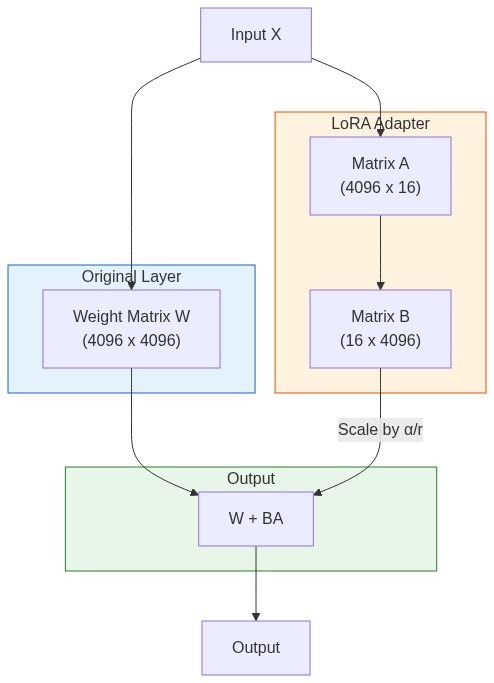
Instead of updating all 7 billion parameters, LoRA adds small trainable matrices to specific layers. For a weight matrix W of size (d × k), LoRA adds:
W' = W + BA
Where B is (d × r) and A is (r × k), with r << d and r << k.
If d = k = 4096 and r = 16, instead of training 16.7M parameters per layer, you train only 131K. That's 99% fewer parameters.
4-bit Quantization with NF4
QLoRA uses a special data type called NormalFloat4 (NF4). It's optimized for normally distributed weights, which neural network parameters typically are.
The base model weights are frozen and stored in 4-bit precision. Only the LoRA adapters train in higher precision (bfloat16). This is why you can fit a 7B model in 6GB—the base model compresses from ~14GB to ~3.5GB.
Environment Setup
Install the required packages:
pip install torch torchvision torchaudio --index-url https://download.pytorch.org/whl/cu118
pip install transformers>=4.51.0
pip install peft>=0.14.0
pip install bitsandbytes>=0.45.0
pip install datasets
pip install trl>=0.21.0
pip install accelerate
Verify CUDA is working:
import torch
print(f"PyTorch: {torch.__version__}")
print(f"CUDA available: {torch.cuda.is_available()}")
if torch.cuda.is_available():
    print(f"GPU: {torch.cuda.get_device_name(0)}")
    print(f"VRAM: {torch.cuda.get_device_properties(0).total_memory / 1e9:.1f} GB")
Complete Training Script
Here's a production-ready script for fine-tuning on a custom dataset:
import torch
from datasets import load_dataset
from transformers import (
    AutoModelForCausalLM,
    AutoTokenizer,
    BitsAndBytesConfig,
    TrainingArguments,
)
from peft import LoraConfig, prepare_model_for_kbit_training, get_peft_model
from trl import SFTTrainer

# ============================================
# Configuration
# ============================================

MODEL_NAME = "mistralai/Mistral-7B-v0.1"
DATASET_NAME = "your-dataset"  # or path to local dataset
OUTPUT_DIR = "./mistral-finetuned"
MAX_SEQ_LENGTH = 2048

# ============================================
# 4-bit Quantization Config
# ============================================

bnb_config = BitsAndBytesConfig(
    load_in_4bit=True,
    bnb_4bit_quant_type="nf4",           # NormalFloat4 - optimal for neural nets
    bnb_4bit_compute_dtype=torch.bfloat16, # Compute in bfloat16 for stability
    bnb_4bit_use_double_quant=True,      # Quantize the quantization constants
)

# ============================================
# Load Model and Tokenizer
# ============================================

print("Loading model...")
model = AutoModelForCausalLM.from_pretrained(
    MODEL_NAME,
    quantization_config=bnb_config,
    device_map="auto",
    trust_remote_code=True,
    attn_implementation="flash_attention_2",  # Faster attention if available
)

tokenizer = AutoTokenizer.from_pretrained(MODEL_NAME)
tokenizer.pad_token = tokenizer.eos_token
tokenizer.padding_side = "right"

# Prepare model for k-bit training
model = prepare_model_for_kbit_training(model)

# ============================================
# LoRA Configuration
# ============================================

lora_config = LoraConfig(
    r=16,                      # Rank - higher = more capacity, more memory
    lora_alpha=32,             # Scaling factor
    target_modules=[           # Which layers to adapt
        "q_proj",
        "k_proj",
        "v_proj",
        "o_proj",
        "gate_proj",
        "up_proj",
        "down_proj",
    ],
    lora_dropout=0.05,
    bias="none",
    task_type="CAUSAL_LM",
)

model = get_peft_model(model, lora_config)

# Print trainable parameters
trainable, total = model.get_nb_trainable_parameters()
print(f"Trainable: {trainable:,} / {total:,} ({100 * trainable / total:.2f}%)")

# ============================================
# Load and Prepare Dataset
# ============================================

def format_instruction(sample):
    """Format dataset samples into instruction format."""
    return f"""### Instruction:
{sample['instruction']}

### Input:
{sample.get('input', '')}

### Response:
{sample['output']}"""

dataset = load_dataset(DATASET_NAME, split="train")

# ============================================
# Training Arguments
# ============================================

training_args = TrainingArguments(
    output_dir=OUTPUT_DIR,
    num_train_epochs=3,
    per_device_train_batch_size=4,
    gradient_accumulation_steps=4,        # Effective batch size = 16
    gradient_checkpointing=True,          # Trade compute for memory
    optim="paged_adamw_8bit",             # Memory-efficient optimizer
    learning_rate=2e-4,
    weight_decay=0.01,
    fp16=False,
    bf16=True,                            # Use bfloat16 if available
    max_grad_norm=0.3,
    warmup_ratio=0.03,
    lr_scheduler_type="cosine",
    logging_steps=10,
    save_strategy="epoch",
    evaluation_strategy="no",
    group_by_length=True,                 # Group similar lengths for efficiency
    report_to="none",                     # Or "wandb" for tracking
)

# ============================================
# Initialize Trainer
# ============================================

trainer = SFTTrainer(
    model=model,
    train_dataset=dataset,
    peft_config=lora_config,
    tokenizer=tokenizer,
    args=training_args,
    formatting_func=format_instruction,
    max_seq_length=MAX_SEQ_LENGTH,
    packing=True,                         # Pack multiple samples per sequence
)

# ============================================
# Train!
# ============================================

print("Starting training...")
trainer.train()

# Save the adapter weights
trainer.save_model()
print(f"Model saved to {OUTPUT_DIR}")
Understanding Key Parameters
LoRA Rank (r)
The rank determines adapter capacity:
- r=8: Minimal overhead, good for simple tasks
- r=16: Balanced choice for most use cases
- r=32-64: Complex tasks requiring more adaptation
Higher rank = more parameters = more memory and slower training.
Target Modules
Which layers get LoRA adapters matters:
# Minimal (fastest, least memory)
target_modules=["q_proj", "v_proj"]

# Attention only (balanced)
target_modules=["q_proj", "k_proj", "v_proj", "o_proj"]

# All linear layers (maximum adaptation)
target_modules="all-linear"
For instruction following, attention layers are usually sufficient. For domain adaptation (like code or medical text), include the MLP layers too.
Gradient Checkpointing
This trades compute for memory by recomputing activations during the backward pass instead of storing them:
gradient_checkpointing=True # Reduces memory by ~60%, training 20% slowerEssential for fitting large models on limited VRAM.
Working with Your Own Data
Data Format Options
The SFTTrainer accepts several formats:
# Format 1: Instruction format (dict)
{
    "instruction": "Summarize this text",
    "input": "Long article here...",
    "output": "Summary here..."
}

# Format 2: Chat format (list of messages)
{
    "messages": [
        {"role": "user", "content": "Summarize this text: ..."},
        {"role": "assistant", "content": "Summary: ..."}
    ]
}

# Format 3: Raw text
{
    "text": "### Human: Question here\n### Assistant: Answer here"
}
Loading Local Data
from datasets import Dataset
import json

# From JSON file
with open("training_data.json", "r") as f:
    data = json.load(f)

dataset = Dataset.from_list(data)

# From CSV
from datasets import load_dataset
dataset = load_dataset("csv", data_files="training_data.csv")["train"]

# From pandas
import pandas as pd
df = pd.read_csv("training_data.csv")
dataset = Dataset.from_pandas(df)
Data Quality Matters
Your model learns from your data. Common issues:
- Too short responses: Model learns to be terse
- Inconsistent formatting: Model gets confused
- Low-quality examples: Model reproduces mistakes
Clean, consistent, high-quality examples beat quantity every time.
Inference with Fine-Tuned Model
Loading the Adapter
from peft import PeftModel
from transformers import AutoModelForCausalLM, AutoTokenizer
import torch

# Load base model
base_model = AutoModelForCausalLM.from_pretrained(
    "mistralai/Mistral-7B-v0.1",
    torch_dtype=torch.bfloat16,
    device_map="auto",
)

# Load and apply adapter
model = PeftModel.from_pretrained(base_model, "./mistral-finetuned")
tokenizer = AutoTokenizer.from_pretrained("mistralai/Mistral-7B-v0.1")

# Generate
def generate(prompt, max_tokens=512):
    inputs = tokenizer(prompt, return_tensors="pt").to(model.device)

    with torch.no_grad():
        outputs = model.generate(
            **inputs,
            max_new_tokens=max_tokens,
            temperature=0.7,
            top_p=0.9,
            do_sample=True,
        )

    return tokenizer.decode(outputs[0], skip_special_tokens=True)

response = generate("### Instruction:\nExplain quantum computing.\n\n### Response:\n")
print(response)
Merging Adapter into Base Model
For deployment, you might want to merge the adapter into the base model to eliminate the overhead:
# Merge adapter weights into base model
merged_model = model.merge_and_unload()

# Save merged model
merged_model.save_pretrained("./mistral-merged")
tokenizer.save_pretrained("./mistral-merged")
The merged model can then be used with any inference framework (vLLM, TGI, Ollama) without special LoRA support.
Optimizing Training Speed
Use Unsloth for 2x Faster Training
Unsloth provides optimized kernels for LoRA training:
from unsloth import FastLanguageModel

model, tokenizer = FastLanguageModel.from_pretrained(
    model_name="unsloth/Mistral-7B-v0.3-bnb-4bit",
    max_seq_length=2048,
    load_in_4bit=True,
)

model = FastLanguageModel.get_peft_model(
    model,
    r=16,
    target_modules=["q_proj", "k_proj", "v_proj", "o_proj",
                    "gate_proj", "up_proj", "down_proj"],
    lora_alpha=16,
    lora_dropout=0,
    bias="none",
    use_gradient_checkpointing="unsloth",  # Unsloth's optimized version
)
Unsloth claims 2-5x speedup with 70% less memory, with no accuracy loss.
Enable Flash Attention 2
model = AutoModelForCausalLM.from_pretrained(
    MODEL_NAME,
    attn_implementation="flash_attention_2",  # Requires flash-attn package
    ...
)
Flash Attention reduces memory usage and speeds up training significantly for long sequences.
Packing Short Sequences
If your training samples vary in length, packing combines multiple samples into single sequences:
trainer = SFTTrainer(
    ...
    packing=True,  # Combine short samples
    max_seq_length=2048,
)
This maximizes GPU utilization by reducing padding waste.
Common Issues and Fixes
Out of Memory
# Reduce batch size
per_device_train_batch_size=2
gradient_accumulation_steps=8  # Keep effective batch size the same

# Enable gradient checkpointing
gradient_checkpointing=True

# Use smaller LoRA rank
r=8  # Instead of 16 or 32

# Reduce sequence length
max_seq_length=1024  # Instead of 2048
Training Loss Not Decreasing
- Learning rate too high: Try 1e-4 instead of 2e-4
- Data format issues: Verify your formatting function output
- Too few epochs: Some tasks need 5-10 epochs to converge
Model Outputs Garbage
- Tokenizer mismatch: Ensure you're using the right tokenizer
- No padding token: Set
tokenizer.pad_token = tokenizer.eos_token - Wrong prompt format: Match the format used during training
Hardware Requirements by Model Size
| Model Size | Full FT | LoRA (16-bit) | QLoRA (4-bit) |
|---|---|---|---|
| 3B (Phi-3) | 24 GB | 8 GB | 4 GB |
| 7B (Mistral) | 60 GB | 16 GB | 6-8 GB |
| 13B (Llama 2) | 120 GB | 32 GB | 12 GB |
| 70B (Llama 2) | 700 GB | 160 GB | 48 GB |
For a 7B model, an RTX 3090/4090 (24GB) gives comfortable headroom. An RTX 3080 (10GB) works with careful tuning.
When to Use QLoRA vs Alternatives
Use QLoRA When:
- Training on consumer GPUs (24GB or less VRAM)
- Fine-tuning for task-specific behavior
- Budget constraints prevent full fine-tuning
- Need fast iteration on experiments
Consider Full Fine-Tuning When:
- Have access to 4+ A100s or equivalent
- Need maximum model quality
- Training data is massive and diverse
- Budget isn't a constraint
Consider LoRA (16-bit) When:
- Have 40-80GB VRAM available
- Want slightly better quality than QLoRA
- Need faster inference (no quantization overhead)
The Bottom Line
QLoRA democratized LLM fine-tuning. What required a $50K cloud setup three years ago now runs on a $2K gaming GPU.
The key insights:
- 4-bit quantization with NF4 compresses base model to 25% size
- Low-rank adapters train only 0.1% of parameters
- Quality loss is minimal—within 1% of full fine-tuning
- Unsloth can double your training speed with optimized kernels
Start with the script above. Experiment with your own data. Fine-tune for your use case. The barrier to entry is now your dataset quality, not your hardware budget.