
You've written the same helper code across three projects. Copy-pasting is getting old. Time to extract it into a gem.
Building a gem sounds intimidating—gemspecs, bundler, RubyGems.org accounts, semantic versioning. But the core process is straightforward. I've published a dozen gems, from simple utilities to complex Rails engines. Here's exactly how to do it.
Why Build a Gem?
Before diving in, make sure a gem is the right solution:
Build a gem when:
- Code is reused across multiple projects
- Others might benefit from your solution
- You want versioning and dependency management
Don't build a gem when:
- Code is project-specific
- It's a one-time script
- The overhead isn't worth it
Step 1: Generate the Skeleton
Bundler creates the standard gem structure:
bundle gem string_toolkitYou'll be prompted for options:
Do you want to generate tests with your gem?
  1) RSpec
  2) Minitest
  3) Test::Unit

Do you want to license your code permissively under the MIT license?
Do you want to include a code of conduct in your gem?
Do you want to include a changelog?

Do you want to add a continuous integration configuration?
  1) GitHub Actions
  2) GitLab CI
  3) Circle CI
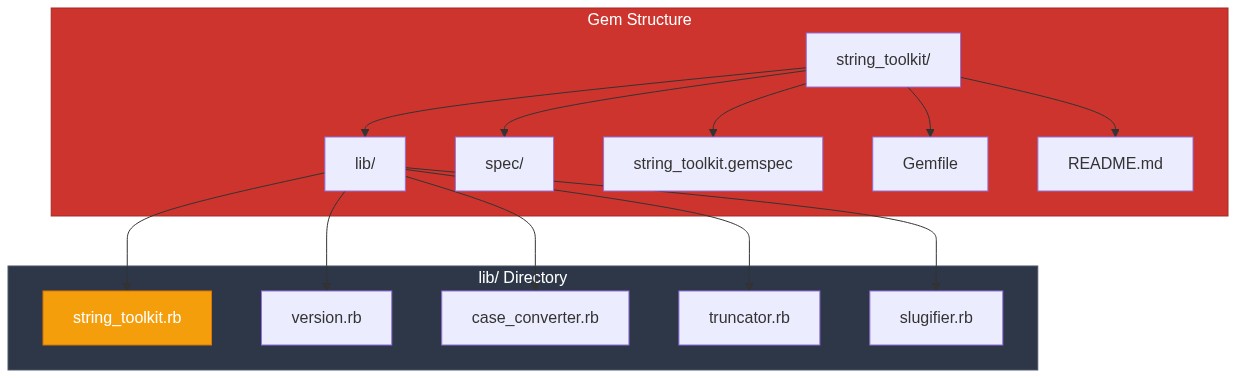
Choose RSpec for tests and MIT for license. The result:
string_toolkit/
├── .github/
│   └── workflows/
│       └── main.yml        # CI configuration
├── lib/
│   ├── string_toolkit/
│   │   └── version.rb      # Version constant
│   └── string_toolkit.rb   # Main entry point
├── spec/
│   ├── spec_helper.rb
│   └── string_toolkit_spec.rb
├── .gitignore
├── .rspec
├── CHANGELOG.md
├── CODE_OF_CONDUCT.md
├── Gemfile
├── LICENSE.txt
├── README.md
├── Rakefile
└── string_toolkit.gemspec
Step 2: Configure the Gemspec
The .gemspec file is your gem's identity. Edit string_toolkit.gemspec:
# frozen_string_literal: true

require_relative "lib/string_toolkit/version"

Gem::Specification.new do |spec|
  spec.name = "string_toolkit"
  spec.version = StringToolkit::VERSION
  spec.authors = ["Your Name"]
  spec.email = ["you@example.com"]

  spec.summary = "A collection of useful string manipulation utilities"
  spec.description = "StringToolkit provides methods for case conversion, " \
                     "truncation, slugification, and other common string operations."
  spec.homepage = "https://github.com/yourusername/string_toolkit"
  spec.license = "MIT"
  spec.required_ruby_version = ">= 3.1.0"

  # Metadata for RubyGems.org
  spec.metadata["homepage_uri"] = spec.homepage
  spec.metadata["source_code_uri"] = spec.homepage
  spec.metadata["changelog_uri"] = "#{spec.homepage}/blob/main/CHANGELOG.md"

  # Files to include in the gem
  spec.files = Dir.glob(%w[
    lib/**/*
    LICENSE.txt
    README.md
    CHANGELOG.md
  ])
  spec.require_paths = ["lib"]

  # Runtime dependencies (needed when gem is used)
  # spec.add_dependency "activesupport", ">= 6.0"

  # Development dependencies (needed for developing the gem)
  spec.add_development_dependency "rspec", "~> 3.12"
  spec.add_development_dependency "rubocop", "~> 1.50"
end
Important Fields
| Field | Purpose |
|---|---|
name | Unique identifier on RubyGems.org |
version | Semantic version number |
summary | One-line description (< 140 chars) |
description | Detailed explanation |
required_ruby_version | Minimum Ruby version |
add_dependency | Runtime requirements |
add_development_dependency | Dev-only requirements |
Step 3: Set the Version
Edit lib/string_toolkit/version.rb:
# frozen_string_literal: true

module StringToolkit
  VERSION = "0.1.0"
end
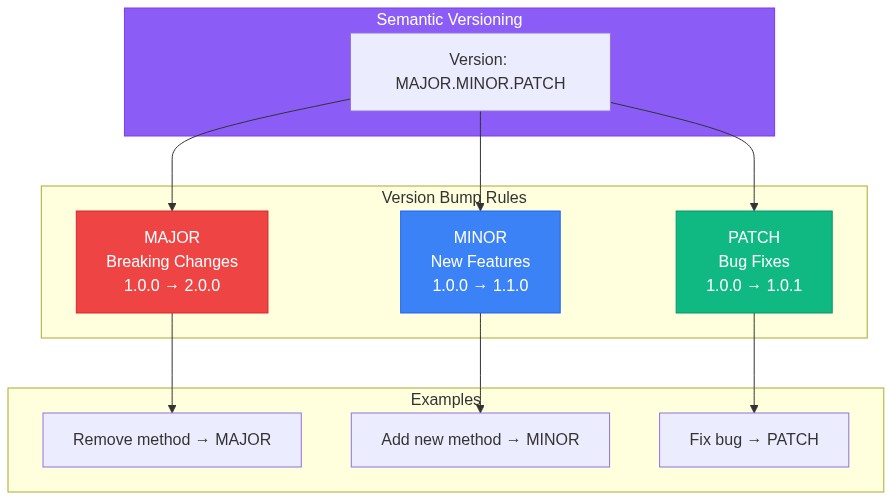
Follow Semantic Versioning:
- MAJOR (1.0.0): Breaking changes
- MINOR (0.1.0): New features, backwards compatible
- PATCH (0.1.1): Bug fixes, backwards compatible
Start at 0.1.0. Below 1.0.0 signals the API isn't stable yet.
Step 4: Write the Code
The main entry point is lib/string_toolkit.rb:
# frozen_string_literal: true

require_relative "string_toolkit/version"
require_relative "string_toolkit/case_converter"
require_relative "string_toolkit/truncator"
require_relative "string_toolkit/slugifier"

module StringToolkit
  class Error < StandardError; end

  class << self
    def to_snake_case(string)
      CaseConverter.to_snake_case(string)
    end

    def to_camel_case(string)
      CaseConverter.to_camel_case(string)
    end

    def truncate(string, length:, omission: "...")
      Truncator.truncate(string, length: length, omission: omission)
    end

    def slugify(string)
      Slugifier.call(string)
    end
  end
end
Create the implementation files:
# lib/string_toolkit/case_converter.rb
# frozen_string_literal: true

module StringToolkit
  module CaseConverter
    module_function

    def to_snake_case(string)
      return "" if string.nil? || string.empty?

      string
        .gsub(/([A-Z]+)([A-Z][a-z])/, '\1_\2')
        .gsub(/([a-z\d])([A-Z])/, '\1_\2')
        .tr("-", "_")
        .downcase
    end

    def to_camel_case(string)
      return "" if string.nil? || string.empty?

      string
        .split(/[_\-\s]+/)
        .map(&:capitalize)
        .join
    end

    def to_lower_camel_case(string)
      result = to_camel_case(string)
      return "" if result.empty?

      result[0].downcase + result[1..]
    end
  end
end
# lib/string_toolkit/truncator.rb
# frozen_string_literal: true
module StringToolkit
module Truncator
module_function
def truncate(string, length:, omission: "...")
return "" if string.nil?
return string if string.length <= length
stop = length - omission.length
return omission if stop <= 0
"#{string[0...stop]}#{omission}"
end
def truncate_words(string, count:, omission: "...")
return "" if string.nil?
words = string.split
return string if words.length <= count
words.first(count).join(" ") + omission
end
end
end# lib/string_toolkit/slugifier.rb
# frozen_string_literal: true
module StringToolkit
module Slugifier
REPLACEMENTS = {
"ä" => "ae", "ö" => "oe", "ü" => "ue",
"Ä" => "ae", "Ö" => "oe", "Ü" => "ue",
"ß" => "ss", "ñ" => "n"
}.freeze
module_function
def call(string)
return "" if string.nil? || string.empty?
result = string.dup
# Replace special characters
REPLACEMENTS.each { |from, to| result.gsub!(from, to) }
result
.downcase
.gsub(/[^a-z0-9\s-]/, "") # Remove non-alphanumeric
.gsub(/[\s_]+/, "-") # Replace spaces/underscores with dashes
.gsub(/-+/, "-") # Remove consecutive dashes
.gsub(/^-|-$/, "") # Remove leading/trailing dashes
end
end
endStep 5: Write Tests
Test each component in spec/:
# spec/string_toolkit_spec.rb
# frozen_string_literal: true

RSpec.describe StringToolkit do
  it "has a version number" do
    expect(StringToolkit::VERSION).not_to be_nil
  end

  describe ".to_snake_case" do
    it "converts camelCase" do
      expect(StringToolkit.to_snake_case("camelCase")).to eq("camel_case")
    end

    it "converts PascalCase" do
      expect(StringToolkit.to_snake_case("PascalCase")).to eq("pascal_case")
    end

    it "handles empty strings" do
      expect(StringToolkit.to_snake_case("")).to eq("")
    end

    it "handles nil" do
      expect(StringToolkit.to_snake_case(nil)).to eq("")
    end
  end

  describe ".truncate" do
    it "truncates long strings" do
      result = StringToolkit.truncate("Hello, World!", length: 8)
      expect(result).to eq("Hello...")
    end

    it "preserves short strings" do
      result = StringToolkit.truncate("Hi", length: 10)
      expect(result).to eq("Hi")
    end

    it "uses custom omission" do
      result = StringToolkit.truncate("Hello, World!", length: 8, omission: "…")
      expect(result).to eq("Hello, …")
    end
  end

  describe ".slugify" do
    it "creates URL-safe slugs" do
      expect(StringToolkit.slugify("Hello World!")).to eq("hello-world")
    end

    it "handles special characters" do
      expect(StringToolkit.slugify("Über Café")).to eq("ueber-cafe")
    end

    it "removes consecutive dashes" do
      expect(StringToolkit.slugify("Hello   World")).to eq("hello-world")
    end
  end
end
# spec/string_toolkit/case_converter_spec.rb
# frozen_string_literal: true
RSpec.describe StringToolkit::CaseConverter do
describe ".to_snake_case" do
[
["simpleTest", "simple_test"],
["easy", "easy"],
["HTMLParser", "html_parser"],
["getHTTPResponse", "get_http_response"],
["already_snake", "already_snake"],
["with-dashes", "with_dashes"],
].each do |input, expected|
it "converts '#{input}' to '#{expected}'" do
expect(described_class.to_snake_case(input)).to eq(expected)
end
end
end
describe ".to_camel_case" do
[
["snake_case", "SnakeCase"],
["already", "Already"],
["with-dashes", "WithDashes"],
["multiple_word_string", "MultipleWordString"],
].each do |input, expected|
it "converts '#{input}' to '#{expected}'" do
expect(described_class.to_camel_case(input)).to eq(expected)
end
end
end
endRun tests:
bundle exec rspecStep 6: Documentation
Write a clear README:
# StringToolkit

A collection of useful string manipulation utilities for Ruby.

## Installation

Add to your Gemfile:

```ruby
gem 'string_toolkit'
Then run:
bundle installOr install directly:
gem install string_toolkitUsage
Case Conversion
StringToolkit.to_snake_case("camelCase")
# => "camel_case"

StringToolkit.to_camel_case("snake_case")
# => "SnakeCase"
Truncation
StringToolkit.truncate("Hello, World!", length: 8)
# => "Hello..."

StringToolkit.truncate("Hello", length: 8, omission: "…")
# => "Hello"  # Not truncated, shorter than length
Slugification
StringToolkit.slugify("Hello World!")
# => "hello-world"

StringToolkit.slugify("Über Café München")
# => "ueber-cafe-muenchen"
Development
After checking out the repo, run bin/setup to install dependencies.
Run rake spec to run tests. Run rake rubocop for linting.
Contributing
Bug reports and pull requests are welcome on GitHub.
License
MIT License. See LICENSE.txt for details.
## Step 7: Build and Test Locally

Build the gem:

```bash
bundle exec rake build
# => string_toolkit 0.1.0 built to pkg/string_toolkit-0.1.0.gem
Install locally and test:
gem install pkg/string_toolkit-0.1.0.gem

# Test in IRB
irb
> require 'string_toolkit'
> StringToolkit.slugify("Test Article Title")
=> "test-article-title"
Step 8: Publish to RubyGems.org

First-Time Setup
- Create account at rubygems.org
- Get your API key from rubygems.org/profile/api_keys
- Save credentials:
gem signin
# Enter your email and password
Or manually configure:
mkdir -p ~/.gem
curl -u your_username https://rubygems.org/api/v1/api_key.yaml > ~/.gem/credentials
chmod 0600 ~/.gem/credentials
Publish
# Final checks
bundle exec rspec              # Tests pass?
bundle exec rubocop            # Code style OK?

# Build
bundle exec rake build

# Push to RubyGems.org
gem push pkg/string_toolkit-0.1.0.gem
Your gem is now available:
gem install string_toolkitReleasing New Versions
Update Version
# lib/string_toolkit/version.rb
module StringToolkit
  VERSION = "0.2.0"  # Was 0.1.0
end
Update Changelog
# Changelog

## [0.2.0] - 2026-01-15

### Added
- `to_lower_camel_case` method
- `truncate_words` method

### Fixed
- Handle nil input in all methods

## [0.1.0] - 2026-01-02

### Added
- Initial release
- Case conversion utilities
- String truncation
- URL slugification
Release
# Commit changes
git add -A
git commit -m "Release v0.2.0"
git tag v0.2.0

# Build and push
bundle exec rake build
gem push pkg/string_toolkit-0.2.0.gem

# Push to GitHub
git push origin main --tags
CI/CD with GitHub Actions
The generated .github/workflows/main.yml runs tests automatically:
name: Ruby

on:
  push:
    branches: [ main ]
  pull_request:
    branches: [ main ]

jobs:
  test:
    runs-on: ubuntu-latest
    strategy:
      matrix:
        ruby-version: ['3.1', '3.2', '3.3']

    steps:
    - uses: actions/checkout@v4
    - name: Set up Ruby
      uses: ruby/setup-ruby@v1
      with:
        ruby-version: $NaN
        bundler-cache: true
    - name: Run tests
      run: bundle exec rspec
    - name: Run linter
      run: bundle exec rubocop
Auto-Publish on Release
Add a publish workflow:
# .github/workflows/publish.yml
name: Publish Gem

on:
  push:
    tags:
      - 'v*'

jobs:
  publish:
    runs-on: ubuntu-latest
    steps:
    - uses: actions/checkout@v4
    - name: Set up Ruby
      uses: ruby/setup-ruby@v1
      with:
        ruby-version: '3.3'
    - name: Build gem
      run: gem build *.gemspec
    - name: Publish to RubyGems
      run: gem push *.gem
      env:
        GEM_HOST_API_KEY: $
Add your RubyGems API key to GitHub Secrets as RUBYGEMS_API_KEY.
Best Practices
Keep Dependencies Minimal
Every dependency is a potential breaking change. Only add what you truly need.
# Think twice before adding
spec.add_dependency "activesupport"  # Brings in many sub-dependencies
Support Multiple Ruby Versions
Test against Ruby versions your users might have:
spec.required_ruby_version = ">= 3.1.0"Write Good Commit Messages
Add truncate_words method

- Truncates by word count instead of character count
- Preserves word boundaries
- Configurable omission string

Closes #12
Respond to Issues
Monitor your GitHub issues. A maintained gem builds trust.
The Bottom Line
Building a gem is straightforward:
bundle gem namecreates the structure- Configure the gemspec with metadata
- Write code in
lib/, tests inspec/ gem pushpublishes to RubyGems.org
The hard part isn't the mechanics—it's designing a good API and maintaining it over time. Start small, document well, and iterate based on feedback.
Your gem doesn't need to be revolutionary. The Ruby ecosystem thrives on small, focused tools that do one thing well.