
Large language models know a lot, but they don't know your data. They can't answer questions about your company's documentation, your product catalog, or yesterday's sales report.
RAG (Retrieval-Augmented Generation) bridges this gap. Instead of fine-tuning a model on your data (expensive, slow), you retrieve relevant context at query time and feed it to the model alongside the question.
I've built RAG systems for legal document search, customer support, and internal knowledge bases. Here's everything I learned about making them work reliably.
How RAG Actually Works
The concept is straightforward:
- Index: Convert your documents into embeddings and store them
- Retrieve: Find documents similar to the user's question
- Generate: Feed the question + retrieved context to an LLM

The magic happens because embedding models place semantically similar text close together in vector space. "What's your refund policy?" and "How do I get my money back?" end up near each other, even though they share few words.
Environment Setup
pip install langchain langchain-openai langchain-community
pip install chromadb    # Vector store
pip install pypdf       # PDF loading
pip install tiktoken    # Token counting
Set your API key:
import os
os.environ["OPENAI_API_KEY"] = "your-key-here"
Step 1: Loading Documents
LangChain provides loaders for most document types:
from langchain_community.document_loaders import (
    PyPDFLoader,
    TextLoader,
    DirectoryLoader,
    UnstructuredMarkdownLoader,
)

# Single PDF
loader = PyPDFLoader("company_handbook.pdf")
documents = loader.load()

# All PDFs in a directory
loader = DirectoryLoader(
    "documents/",
    glob="**/*.pdf",
    loader_cls=PyPDFLoader,
    show_progress=True
)
documents = loader.load()

# Markdown files
loader = DirectoryLoader(
    "docs/",
    glob="**/*.md",
    loader_cls=UnstructuredMarkdownLoader
)
documents = loader.load()

print(f"Loaded {len(documents)} documents")
Each document has:
page_content: The actual textmetadata: Source file, page number, etc.
Custom Loaders
For databases or APIs, create a custom loader:
from langchain.schema import Document
import requests

def load_from_api(api_url: str) -> list[Document]:
    """Load documents from a REST API."""
    response = requests.get(api_url)
    data = response.json()

    documents = []
    for item in data['articles']:
        doc = Document(
            page_content=item['content'],
            metadata={
                "source": api_url,
                "id": item['id'],
                "title": item['title'],
                "updated_at": item['updated_at']
            }
        )
        documents.append(doc)

    return documents

# Usage
docs = load_from_api("https://api.example.com/knowledge-base")
Step 2: Chunking Documents
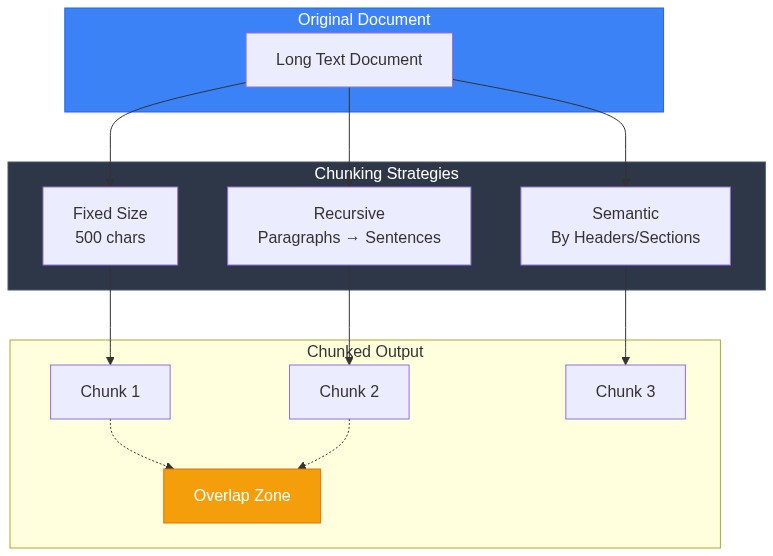
Raw documents are too large for embedding and retrieval. Split them into chunks:
from langchain.text_splitter import RecursiveCharacterTextSplitter

splitter = RecursiveCharacterTextSplitter(
    chunk_size=1000,         # Characters per chunk
    chunk_overlap=200,       # Overlap between chunks
    length_function=len,
    separators=["\n\n", "\n", ". ", " ", ""]  # Split priority
)

chunks = splitter.split_documents(documents)
print(f"Split into {len(chunks)} chunks")
Chunking Strategy Matters
| Chunk Size | Pros | Cons |
|---|---|---|
| Small (200-500) | Precise retrieval | May lose context |
| Medium (500-1000) | Balanced | Good default |
| Large (1000-2000) | More context | Less precise, higher cost |
The overlap ensures context isn't lost at chunk boundaries. A sentence split across chunks would be incomplete without overlap.
Semantic Chunking
For better results, chunk by semantic boundaries:
from langchain.text_splitter import MarkdownHeaderTextSplitter

# Split markdown by headers
headers_to_split_on = [
    ("#", "Header 1"),
    ("##", "Header 2"),
    ("###", "Header 3"),
]

markdown_splitter = MarkdownHeaderTextSplitter(
    headers_to_split_on=headers_to_split_on
)

# First split by headers, then by size
md_docs = markdown_splitter.split_text(markdown_content)

# Further split large sections
text_splitter = RecursiveCharacterTextSplitter(
    chunk_size=1000,
    chunk_overlap=200
)
chunks = text_splitter.split_documents(md_docs)
Step 3: Creating Embeddings
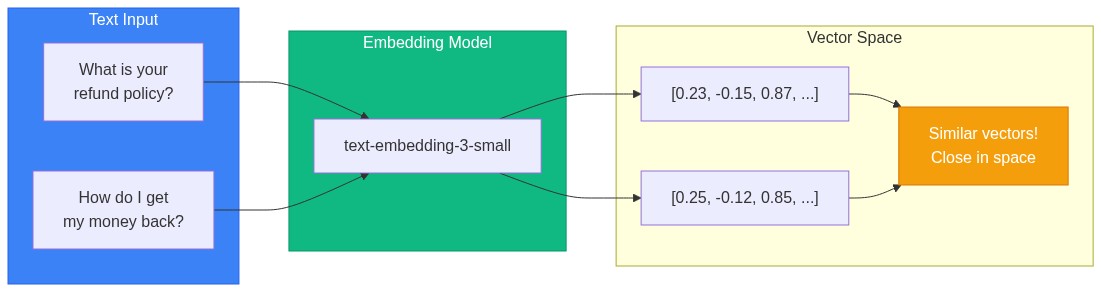
Convert chunks to vectors:
from langchain_openai import OpenAIEmbeddings

embeddings = OpenAIEmbeddings(
    model="text-embedding-3-small",  # Fast, cheap, good quality
    # model="text-embedding-3-large",  # Higher quality, more expensive
)

# Test it
test_embedding = embeddings.embed_query("What is your return policy?")
print(f"Embedding dimension: {len(test_embedding)}")  # 1536 for text-embedding-3-small
Embedding Model Comparison
| Model | Dimensions | Cost (1M tokens) | Quality |
|---|---|---|---|
| text-embedding-3-small | 1536 | $0.02 | Good |
| text-embedding-3-large | 3072 | $0.13 | Best |
| text-embedding-ada-002 | 1536 | $0.10 | Legacy |
For most use cases, text-embedding-3-small offers the best value.
Step 4: Vector Store
Store embeddings for fast similarity search:
from langchain_community.vectorstores import Chroma

# Create and persist vector store
vectorstore = Chroma.from_documents(
    documents=chunks,
    embedding=embeddings,
    persist_directory="./chroma_db",
    collection_name="knowledge_base"
)

print(f"Stored {vectorstore._collection.count()} chunks")
Loading Existing Store
# Load persisted store
vectorstore = Chroma(
    persist_directory="./chroma_db",
    embedding_function=embeddings,
    collection_name="knowledge_base"
)
Alternative: FAISS for Speed
from langchain_community.vectorstores import FAISS

# Create FAISS index
vectorstore = FAISS.from_documents(chunks, embeddings)

# Save to disk
vectorstore.save_local("faiss_index")

# Load from disk
vectorstore = FAISS.load_local(
    "faiss_index",
    embeddings,
    allow_dangerous_deserialization=True  # Required for loading
)
FAISS is faster but requires loading everything into memory. Chroma handles larger datasets more gracefully.
Step 5: Retrieval
Create a retriever to find relevant chunks:
# Basic retriever
retriever = vectorstore.as_retriever(
    search_type="similarity",
    search_kwargs={"k": 4}  # Return top 4 chunks
)

# Test retrieval
query = "What is the refund policy?"
docs = retriever.invoke(query)

for i, doc in enumerate(docs):
    print(f"\n--- Result {i+1} ---")
    print(f"Source: {doc.metadata.get('source', 'Unknown')}")
    print(f"Content: {doc.page_content[:200]}...")
Advanced Retrieval: MMR
Maximum Marginal Relevance balances relevance with diversity:
retriever = vectorstore.as_retriever(
    search_type="mmr",
    search_kwargs={
        "k": 4,
        "fetch_k": 20,  # Fetch 20, select 4 diverse ones
        "lambda_mult": 0.5  # 0=max diversity, 1=max relevance
    }
)
MMR prevents returning 4 chunks that all say the same thing.
Hybrid Search
Combine vector similarity with keyword matching:
from langchain.retrievers import BM25Retriever, EnsembleRetriever

# Keyword-based retriever
bm25_retriever = BM25Retriever.from_documents(chunks)
bm25_retriever.k = 4

# Vector retriever
vector_retriever = vectorstore.as_retriever(search_kwargs={"k": 4})

# Ensemble: combine both
ensemble_retriever = EnsembleRetriever(
    retrievers=[bm25_retriever, vector_retriever],
    weights=[0.3, 0.7]  # Weight vector search higher
)

docs = ensemble_retriever.invoke("refund policy section 4.2")
Hybrid search helps when users include specific terms (like section numbers) that exact matching handles better.
Step 6: Generation
Combine retrieval with LLM generation:
from langchain_openai import ChatOpenAI
from langchain.chains import RetrievalQA
from langchain.prompts import PromptTemplate

# LLM
llm = ChatOpenAI(
    model="gpt-4o-mini",  # Fast and cheap
    temperature=0  # Deterministic outputs
)

# Custom prompt
prompt_template = """Use the following context to answer the question.
If you don't know the answer based on the context, say "I don't have enough information to answer that."

Context:
{context}

Question: {question}

Answer:"""

prompt = PromptTemplate(
    template=prompt_template,
    input_variables=["context", "question"]
)

# RAG chain
qa_chain = RetrievalQA.from_chain_type(
    llm=llm,
    chain_type="stuff",  # Stuff all context into one prompt
    retriever=retriever,
    return_source_documents=True,
    chain_type_kwargs={"prompt": prompt}
)

# Query
result = qa_chain.invoke({"query": "What is your refund policy?"})

print("Answer:", result["result"])
print("\nSources:")
for doc in result["source_documents"]:
    print(f"  - {doc.metadata.get('source', 'Unknown')}")
Complete Production-Ready Example
Here's a full implementation with error handling and configuration:
from langchain_openai import OpenAIEmbeddings, ChatOpenAI
from langchain_community.vectorstores import Chroma
from langchain_community.document_loaders import DirectoryLoader, PyPDFLoader
from langchain.text_splitter import RecursiveCharacterTextSplitter
from langchain.chains import RetrievalQA
from langchain.prompts import PromptTemplate
import os
from typing import Optional

class RAGSystem:
    def __init__(
        self,
        persist_dir: str = "./chroma_db",
        collection_name: str = "documents",
        embedding_model: str = "text-embedding-3-small",
        llm_model: str = "gpt-4o-mini",
        chunk_size: int = 1000,
        chunk_overlap: int = 200,
    ):
        self.persist_dir = persist_dir
        self.collection_name = collection_name
        self.chunk_size = chunk_size
        self.chunk_overlap = chunk_overlap

        # Initialize embeddings
        self.embeddings = OpenAIEmbeddings(model=embedding_model)

        # Initialize LLM
        self.llm = ChatOpenAI(model=llm_model, temperature=0)

        # Load or create vector store
        self.vectorstore = self._load_or_create_vectorstore()

        # Create QA chain
        self.qa_chain = self._create_qa_chain()

    def _load_or_create_vectorstore(self) -> Chroma:
        """Load existing vectorstore or create empty one."""
        return Chroma(
            persist_directory=self.persist_dir,
            embedding_function=self.embeddings,
            collection_name=self.collection_name
        )

    def _create_qa_chain(self) -> RetrievalQA:
        """Create the QA chain with custom prompt."""
        prompt_template = """You are a helpful assistant answering questions based on the provided context.

Context:
{context}

Question: {question}

Instructions:
- Answer based only on the provided context
- If the context doesn't contain the answer, say "I couldn't find information about that in the documents"
- Be concise but complete
- Cite specific sections when relevant

Answer:"""

        prompt = PromptTemplate(
            template=prompt_template,
            input_variables=["context", "question"]
        )

        retriever = self.vectorstore.as_retriever(
            search_type="mmr",
            search_kwargs={"k": 4, "fetch_k": 10}
        )

        return RetrievalQA.from_chain_type(
            llm=self.llm,
            chain_type="stuff",
            retriever=retriever,
            return_source_documents=True,
            chain_type_kwargs={"prompt": prompt}
        )

    def ingest_documents(self, directory: str, glob_pattern: str = "**/*.pdf"):
        """Load and index documents from a directory."""
        print(f"Loading documents from {directory}...")

        # Load documents
        loader = DirectoryLoader(
            directory,
            glob=glob_pattern,
            loader_cls=PyPDFLoader,
            show_progress=True
        )
        documents = loader.load()
        print(f"Loaded {len(documents)} documents")

        # Split into chunks
        splitter = RecursiveCharacterTextSplitter(
            chunk_size=self.chunk_size,
            chunk_overlap=self.chunk_overlap
        )
        chunks = splitter.split_documents(documents)
        print(f"Split into {len(chunks)} chunks")

        # Add to vector store
        self.vectorstore.add_documents(chunks)
        print(f"Indexed {len(chunks)} chunks")

        # Recreate QA chain with updated retriever
        self.qa_chain = self._create_qa_chain()

    def query(self, question: str) -> dict:
        """Query the RAG system."""
        result = self.qa_chain.invoke({"query": question})

        return {
            "answer": result["result"],
            "sources": [
                {
                    "content": doc.page_content[:200] + "...",
                    "source": doc.metadata.get("source", "Unknown"),
                    "page": doc.metadata.get("page", "N/A")
                }
                for doc in result["source_documents"]
            ]
        }

    def get_stats(self) -> dict:
        """Get statistics about the index."""
        return {
            "total_chunks": self.vectorstore._collection.count(),
            "persist_directory": self.persist_dir,
            "collection_name": self.collection_name
        }


# Usage
if __name__ == "__main__":
    # Initialize
    rag = RAGSystem()

    # Ingest documents (run once)
    # rag.ingest_documents("./documents", "**/*.pdf")

    # Query
    result = rag.query("What is the vacation policy?")

    print("Answer:", result["answer"])
    print("\nSources:")
    for source in result["sources"]:
        print(f"  - {source['source']} (page {source['page']})")
Common Problems and Solutions
Problem: Irrelevant Results
Symptoms: Retrieved chunks don't match the question.
Solutions:
- Improve chunking: Larger chunks, semantic boundaries
- Try hybrid search: Add BM25 for keyword matching
- Increase k: Retrieve more, let LLM filter
- Better embeddings: Try
text-embedding-3-large
Problem: Missing Context
Symptoms: Answer is incomplete, misses important details.
Solutions:
- Increase chunk overlap: 200-300 characters
- Add parent document retriever: Retrieve chunk, return full section
- Increase k: More context for the LLM
from langchain.retrievers import ParentDocumentRetriever
from langchain.storage import InMemoryStore

# Store full documents
docstore = InMemoryStore()

# Child splitter for retrieval
child_splitter = RecursiveCharacterTextSplitter(chunk_size=400)

# Parent splitter for context
parent_splitter = RecursiveCharacterTextSplitter(chunk_size=2000)

retriever = ParentDocumentRetriever(
    vectorstore=vectorstore,
    docstore=docstore,
    child_splitter=child_splitter,
    parent_splitter=parent_splitter,
)
Problem: Hallucinations
Symptoms: Model makes up information not in context.
Solutions:
- Stronger prompt: "Only use provided context"
- Lower temperature: Set to 0
- Add citations: Force model to cite sources
- Validation: Check answer against sources
Performance Optimization
Caching Embeddings
from langchain.embeddings import CacheBackedEmbeddings
from langchain.storage import LocalFileStore

# Cache embeddings to disk
store = LocalFileStore("./embedding_cache")

cached_embeddings = CacheBackedEmbeddings.from_bytes_store(
    embeddings,
    store,
    namespace="text-embedding-3-small"
)
Async for Throughput
import asyncio
from langchain.chains import RetrievalQA

async def batch_query(rag_system, questions: list[str]):
    """Process multiple questions concurrently."""
    tasks = [
        asyncio.create_task(
            asyncio.to_thread(rag_system.query, q)
        )
        for q in questions
    ]
    return await asyncio.gather(*tasks)

# Usage
questions = ["What is X?", "How do I Y?", "When does Z?"]
results = asyncio.run(batch_query(rag, questions))
The Bottom Line
RAG lets you build AI applications on your own data without fine-tuning. The key components:
- Chunking: Split documents intelligently, preserve context
- Embeddings: Choose model based on cost/quality trade-off
- Retrieval: Use MMR or hybrid for diverse, relevant results
- Prompting: Clear instructions prevent hallucinations
Start simple with the basic pipeline. Add complexity (hybrid search, parent documents, reranking) only when you have evidence the simple approach isn't working.
The hardest part isn't the code—it's curating good source documents. Garbage in, garbage out. Invest in document quality before optimizing retrieval.